iKITMovie Help Guide
iKITMovie Welcome
Interface Guide
iKITMovie 2.0 Interface
Preview Window
The Timeline
Zooming The Timeline
Editing Frames
Working with Sounds & Music
Main Menu
Full Screen Mode
Lets Animate
Getting Started
Check Your Webcam
Choosing your Image size
Capturing images
The Timeline
Viewing your animation in iKIT
Adding Sounds
Removing Sounds
Moving Sounds
Adding your Voice
Adding Music
Publishing/Exporting Your Animation
Uploading to Youtube
To properly display this page you need a browser with JavaScript support.
< Previous page
Next page >
Interface Guide
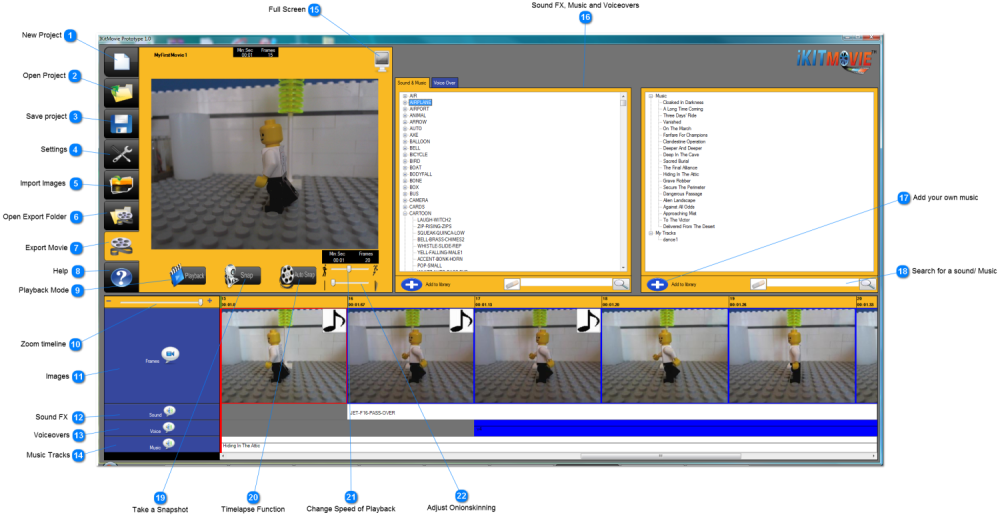
All areas and buttons are explained in some detail in the next section..
What do all these buttons do ?
The contents of Interface Guide
iKITMovie 2.0 Interface
Preview Window
The Timeline
Main Menu
Created with help of DrExplain
TODO: set footer in Options->Project settings->HTML Export->Setup HTML template layout